
Home > Configuration Portal > Year-end Review Plan Management > Create a New Year-end Review Plan
Create a New Year-end Review Plan
Follow the steps below to create a new year-end review plan:
-
Navigate to Performance management > Year-end review and then locate the layer you want to add the review plan.
-
Click Create on the command bar.
-
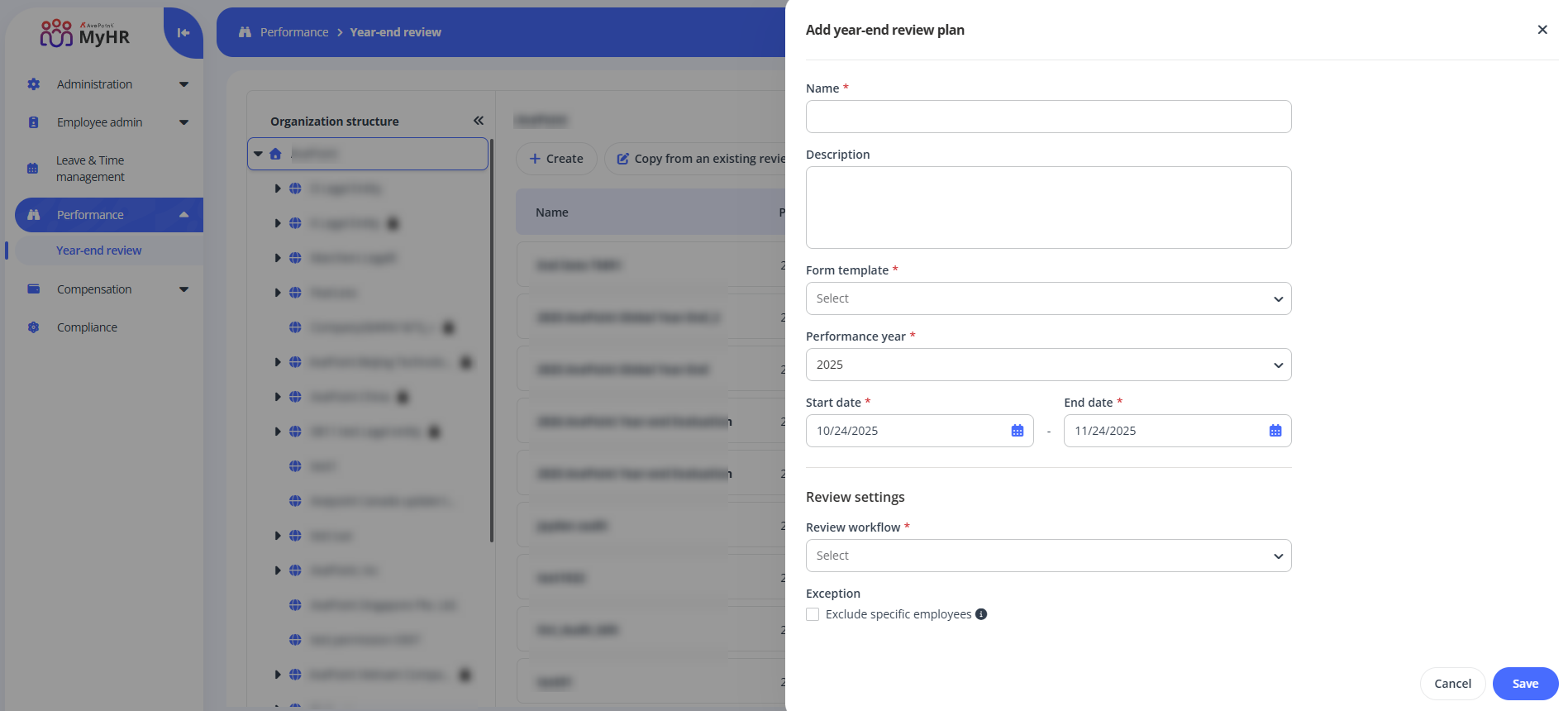
In the Add year-end review plan panel, complete the following settings:
-
Name – Enter a name for the plan you are creating.
-
Description – Enter description for your review plan. The field is optional.
-
Form template – Select a form template from the drop-down list.
-
Performance year – Select the performance year.
-
Date – Configure the start date and end date.
-
Review settings – Complete the review settings.
- Review workflow – Choose a review workflow from the drop-down list.
- Exception – To exclude specific employees from the review plan, select the Exclude specific employees option.
-
-
Click Save to save your review plan.
ON THIS PAGE